

How To Create A Bot On Slack
Build Your Own Slack Bot in Go
How to write a Slack bot in Go!
Slack bots are fun, useful and easy to write! Here's how you can write one yourself, in Go.
This is what our finished bot can do:
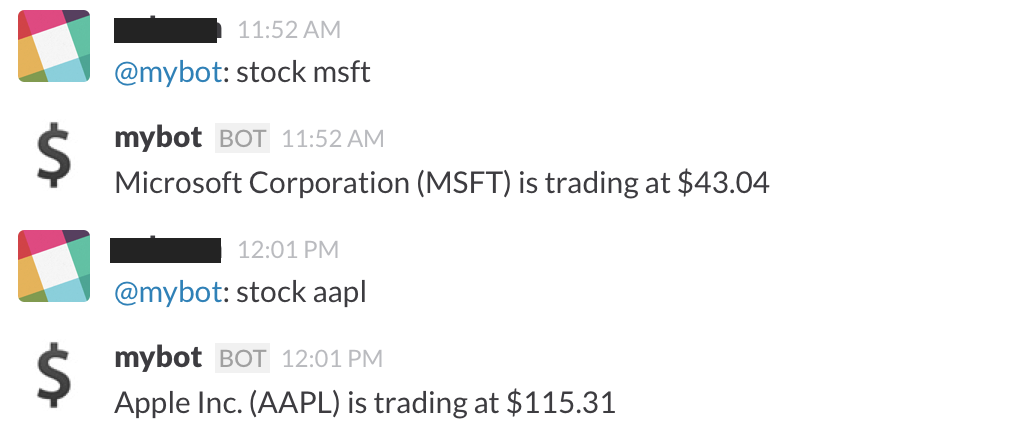
You need to have a Slack account (with enough privileges to create a bot), and know a bit of Go. Let's start!
Go to https://YOURORG.slack.com/services/new/bot and create a new Slack bot by choosing a username (You'll need to substitute YOURORG with your Slack account's domain). Copy the API Token from the next page, and save it for later use.
At this point, you should be able to see the bot username in your Slack client, in a logged out state. It joins #general by default.
Now let's get the mybot code from github to hack on:
go get github.com/rapidloop/mybot You should have the binary in $GOPATH/bin after it completes. Run it to see what it does:
$ mybot usage: mybot slack-bot-token $ mybot xxxx-99999999999-USE.THE.TOKEN.FROM.ABOVE mybot ready, ^C exits mybot now is ready to fetch you stock quotes as in the screenshot above. Hit ^C when you're done playing with it, and let's see some code!
The Code
[Disclaimer: The mybot code is meant for illustration only. It does not have enough error checking/input sanitization code. Do NOT use it in production.]
First up, we need to use the token to start a Real Time Message API session. We use the rtm.start API for this. As the documentation states, we need to pass the token to rtm.start, and it responds with a whole bunch of stuff. Thankfully, we only need a couple of things from this response.
Here's how we make the call (file slack.go, method slackStart):
url := fmt . Sprintf ( "https://slack.com/api/rtm.start?token=%s" , token ) resp , err := http . Get ( url ) //... body , err := ioutil . ReadAll ( resp . Body ) //... var respObj responseRtmStart err = json . Unmarshal ( body , & respObj ) That performs an HTTP GET, reads the body of the response, and JSON-decodes it into responseRtmStart. Like we said, we only need a couple of things from the response. The encoding/json package's Unmarshal method conveniently ignores extra fields in the input JSON object, which lets us define the responseRtmStart structure rather minimally:
type responseRtmStart struct { Ok bool `json:"ok"` Error string `json:"error"` Url string `json:"url"` Self responseSelf `json:"self"` } type responseSelf struct { Id string `json:"id"` } The url field in the response is a Websocket URL to which we can connect to and start the RTM session. We also pick up the id parameter, which is the user ID of the bot, and looks like U1A2B3C4D. We'll need this later to watch for mentions.
Using the Real Time Message API
Go's "extra" libraries from golang.org/x includes a websocket package: golang.org/x/net/websocket. It also includes a JSON codec that provides wrappers for sending and receiving JSON objects over the websocket.
Starting a websocket connection using this package is easy (file slack.go, method slackConnect):
ws , err := websocket . Dial ( wsurl , "" , "https://api.slack.com/" ) Over this connection, Slack notifies us of nearly everything that happen in the chat rooms. These notifications include messages posted by users into channels that mybot is participating in, or sent as DMs to mybot. These are the ones we are interested in.
Each notification is a JSON object, having the common field "type". The ones we are looking for have the value "message" for "type". As before, we pick out the other relevant fields in these type of JSON objects using a struct (file slack.go):
type Message struct { Id uint64 `json:"id"` Type string `json:"type"` Channel string `json:"channel"` Text string `json:"text"` } To read these off the websocket connection, we use (file slack.go):
func getMessage ( ws * websocket . Conn ) ( m Message , err error ) { err = websocket . JSON . Receive ( ws , & m ) return } We can also post messages to a channel by writing a similar object back into the websocket. Note that there is no concept of replying to a message, you can only post messages into a channel. We need to supply a unique ID for each message we post, so we make use of an atomically incremented counter:
var counter uint64 func postMessage ( ws * websocket . Conn , m Message ) error { m . Id = atomic . AddUint64 ( & counter , 1 ) return websocket . JSON . Send ( ws , m ) } The Main Loop
With all this plumbing in place, we can write a main loop that looks like this (file main.go):
ws , id := slackConnect ( token ) for { msg , err := getMessage ( ws ) // ... // process message and respond if necessary // ... postMessage ( ws , reply ) } The bot will receive all messages, so we need to pick out only the ones that mention the bot. Slack replaces all mentions of a user, with the string <@U1A2B3C4D> (where U1A2B3C4D is the user ID of the mentioned user) in message texts. So, a message like @mybot: stock goog becomes <@U1A2B3C4D>: stock goog. We use this information to listen for mentions:
if m . Type == "message" && strings . HasPrefix ( m . Text , "<@" + id + ">" ) { and to parse out relevant fields from the text:
parts := strings . Fields ( m . Text ) if len ( parts ) == 3 && parts [ 1 ] == "stock" { // get quote for parts[2] and post it } else { m . Text = fmt . Sprintf ( "sorry, i didn't get that \n " ) postMessage ( ws , m ) } For getting a quote and posting it, we use a goroutine, since we don't want to block the websocket event loop:
go func ( m Message ) { m . Text = getQuote ( parts [ 2 ]) postMessage ( ws , m ) }( m ) Finally, the getQuote method itself fetches the stock quote for the given ticker using a Yahoo API. You should, of course, throw this out and replace it with something useful and relevant to your team!
There are also other interesting things that the bot can do that we do not cover here.
Have fun building your own bot! Here are some useful links:
- mybot code on github
- Slack rtm.start API
- Slack RTM API
- websocket API docs
Try OpsDash SaaS Today!
14-day free trial — no credit card required
Sign Up
Looking for self-hosted? Sign up here.
How To Create A Bot On Slack
Source: https://www.opsdash.com/blog/slack-bot-in-golang.html
Posted by: blakeboarking.blogspot.com
0 Response to "How To Create A Bot On Slack"
Post a Comment